How to Make a Portrait Tattoo Stencil for Realism
By Simon Turkovič · Co-founder, Stencil AI · 5 min read
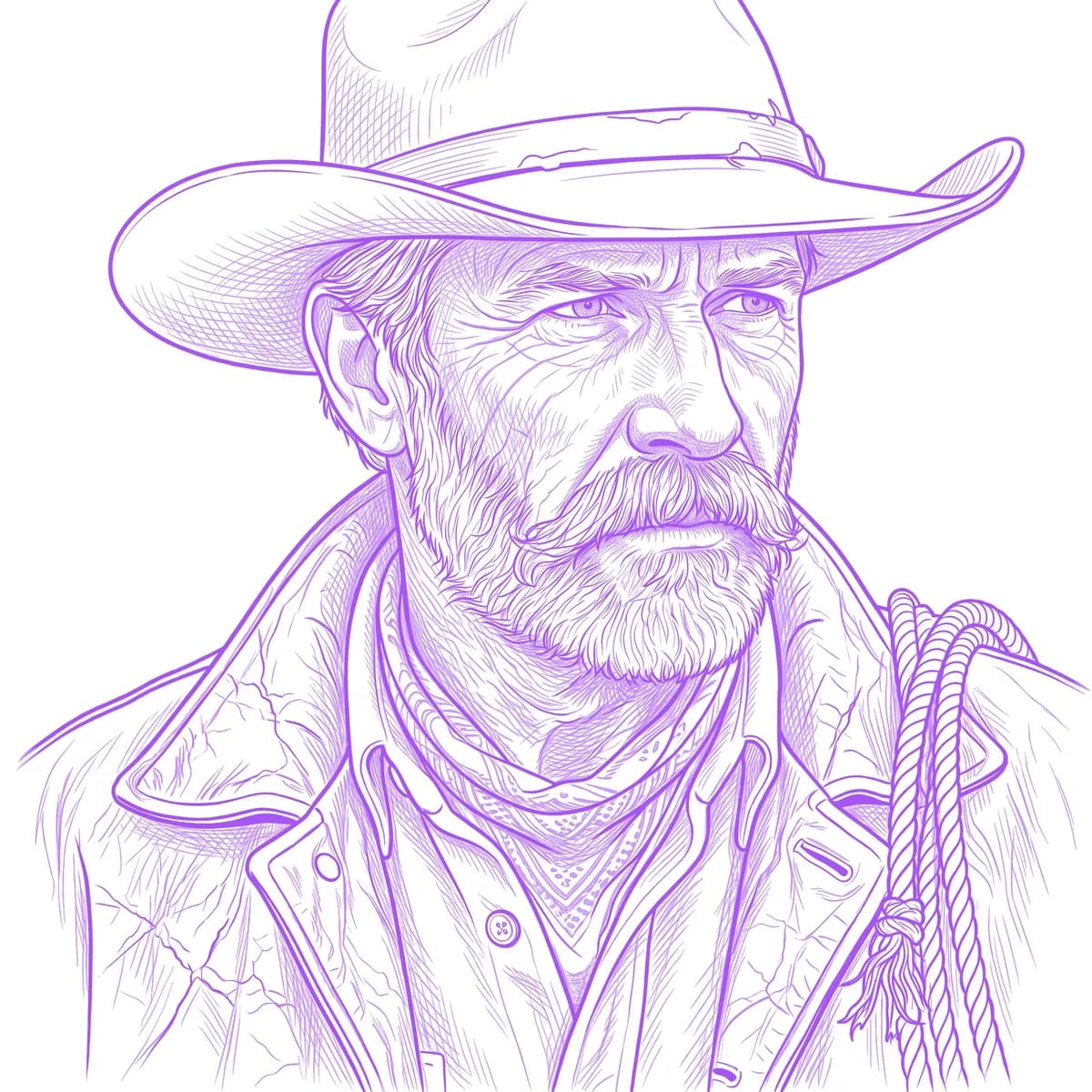
A portrait stencil has one job: keep the likeness. Get the eyes and the proportions right on the skin and the shading can follow; get them wrong and no amount of shading saves the piece. This guide covers how to make a portrait tattoo stencil for realism work — choosing the reference, deciding what goes on the stencil, sizing a face, and cleaning it up before you print.
A portrait tattoo stencil, in 6 steps
- Pick a sharp, well-lit reference with clear light and shadow on the face.
- Crop it to the composition you'll tattoo, and remove the background.
- Trace the features precisely: eyes, nose, mouth, jawline and hairline.
- Map the main shadow shapes as borders or light hatching, not solid fills.
- Size it so the eyes are big enough to hold their detail.
- Clean up stray lines, print at 100% and check the likeness against the photo.
Start with the right reference
The stencil can't be better than the photo. Before anything else, check the reference:
- Sharp. Zoom in on the eyes: you should see the edge of the iris and the eyelids clearly.
- Lit from one side. One clear light source gives defined shadows, and the shadows are what a realism stencil maps. Flat, front-on flash lighting removes them.
- Unfiltered. Beauty filters, skin smoothing and heavy compression wipe out the edges and texture the stencil needs.
- Unobstructed. Hair across the eyes, sunglasses or a hand in front of the face leave the stencil guessing.
If the client has several photos, choose together before you start. Changing the reference halfway costs more time than picking well.
What goes on a portrait stencil (and what stays off)
A portrait stencil is a map, not a drawing. It needs:
- the outlines of the features: eyes and eyelids, the shape of the nose and nostrils, the lips, the ears
- the outline of the face, the jawline and the hairline
- the borders of the main shadow shapes, so you know where each value changes
- the wrinkles and creases that make the expression
Skin texture, individual hairs and soft gradients usually stay off. They're shaded freehand from the reference, and too many lines on the skin turn into noise. Many realism artists map the shadow shapes with thin outlines; others prefer light hatching that follows the form.
Outline, Standard or Hatching?
Stencil AI makes three styles, and each suits a different kind of portrait:
- Outline — the features only, in clean single-weight lines. For illustrative or neo-traditional portraits, or when you'll shade freehand from the photo.
- Standard — outlines plus the main shadows grouped into tonal blocks. A clear map for black-and-grey shading.
- Hatching — cross-hatched shadow tracking that follows the form. The most information for realism: faces, skin, hair and fur.
Hatching is included on the Pro and Studio plans; Outline and Standard work on every plan. Not sure which suits the piece? Try two styles on the same photo and compare them side by side.
How big should a portrait tattoo be?
There's no fixed minimum. It depends on the style, your needle groupings and how much detail the face carries, but the eyes are the test: each eye on the stencil should be big enough for the iris, the eyelids and the highlight to stay separate details. If they merge into one mark at the planned size, the portrait needs to be bigger, or simpler.
Decide the size on the body, not on the screen: see how to size a tattoo stencil.
Clean it up before printing
Whatever made the linework, go over it before it's printed:
- Remove stray marks and background lines that aren't part of the portrait.
- Lighten areas that came out too busy, such as skin texture or hair.
- Fix doubled or broken lines along the edges of the features.
- Keep the eyes and the mouth crisp: they carry the likeness.
In Stencil AI, the Retouch editor handles the cleanup in the app and in the browser: erase stray marks, redraw lines, lighten or darken areas with pressure-sensitive brushes, and tap to remove unwanted solid fills while the outlines stay protected. In the app you can also prep the photo before generating — crop it, cut out the subject and erase distractions — so you don't spend a credit on a messy reference.
Check the likeness before it touches skin
- Compare it with the photo. Hold the print next to the reference and check the spacing of the eyes, the length of the nose and the width of the mouth. Small errors there change who the face looks like.
- Flip it. Looking at the stencil mirrored or upside down makes proportions that are off jump out — the same trick artists use on their drawings.
- Mirror it for the transfer if your method needs it. The print guide explains when.
Stencil AI turns a portrait photo into a stencil in about 30–60 seconds. It works from the photo — there's no prompt, and it doesn't invent a face — but like any automatic tracing it can misplace a detail, so check the eyes and the mouth against the photo and fix them before you print. During the session, the app's Tattoo Mode keeps the stencil and the photo on screen, with the display awake.
Frequently asked questions
How do you make a stencil for a portrait tattoo?
Start from a sharp, well-lit photo, crop it and remove the background, then trace the features and the borders of the main shadows — by hand, in a drawing app, or with a stencil app such as Stencil AI, which turns the photo into linework in about 30–60 seconds. Clean up stray lines, size it so the eyes hold their detail, and print at 100%.
What should be on a realism tattoo stencil?
The outlines of the features, the face shape and hairline, and the borders of the main shadow shapes, often as light hatching. Skin texture, individual hairs and soft gradients usually stay off the stencil and are shaded freehand from the reference.
What is the best photo for a portrait tattoo?
A sharp, high-resolution photo with one clear light source, visible shadows and nothing covering the eyes. Heavy filters, beauty smoothing and flat flash lighting remove the detail a realism stencil needs.
Should a portrait stencil be outline or hatching?
It depends on the style. Outlines suit illustrative portraits, while black-and-grey realism benefits from a stencil that also maps the shadows. Stencil AI's Hatching style tracks shadows with cross-hatching; Standard groups them into simpler tonal blocks.
Turn a portrait photo into a stencil
Upload the client's photo and get hatching or outline linework in about 30–60 seconds, then retouch it and print it true to size.
Try Stencil AI